Card and list host views
Switch between dense tables and scannable cards, with pinned actions, sticky headers, and selection details.
 ShellDesk
Pure Rust SSH workspace and remote operations toolkit
Organize SSH and local hosts with card and list views, then use russh-powered terminals, SFTP, browser and VNC tunnels, database panels, WebDAV sync, and 39 remote desktop apps without requiring system OpenSSH.
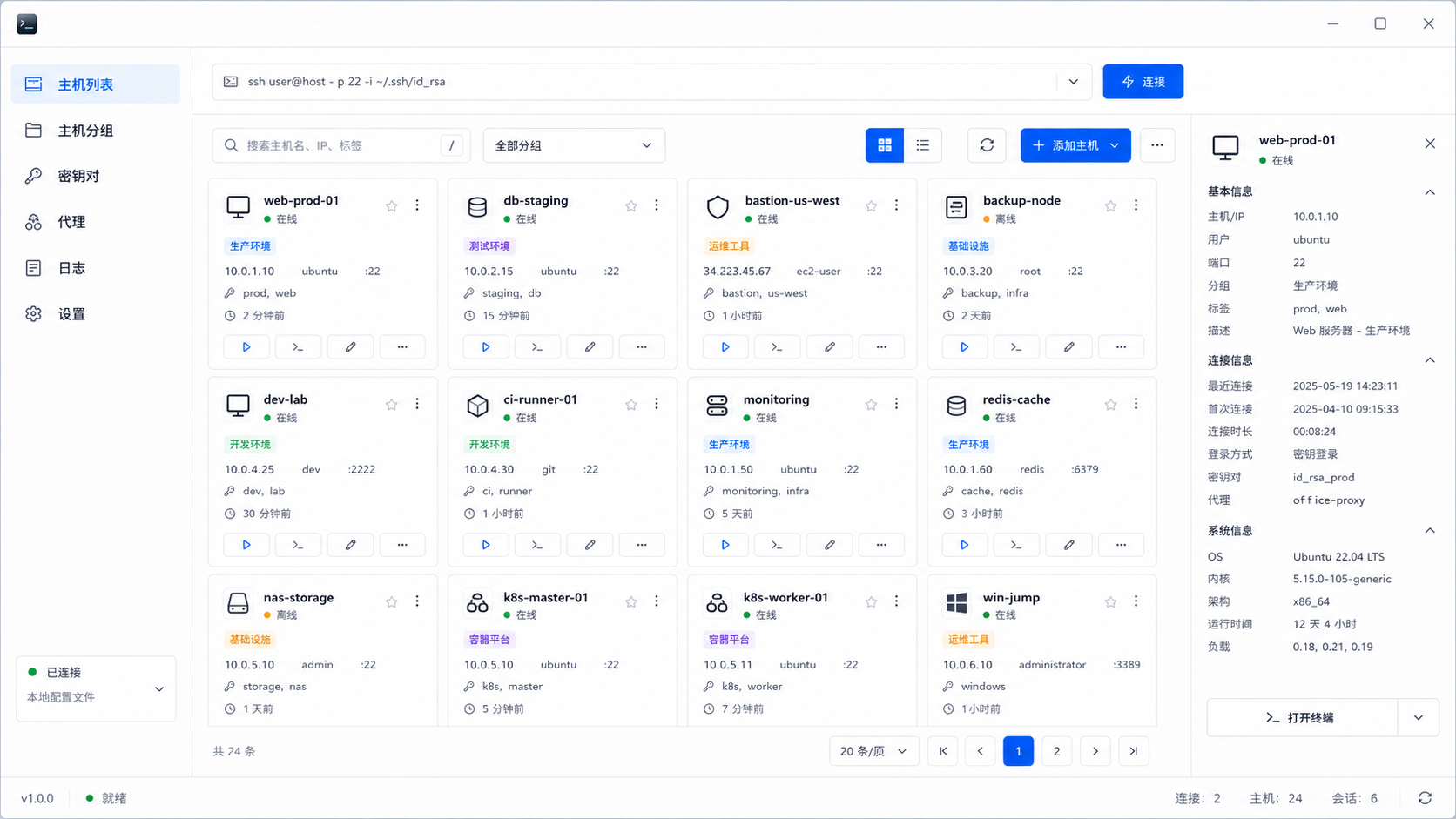
The redesigned home screen keeps hosts, snippets, keys, known hosts, proxies, logs, settings, and the full SSH or local workbench in one compact operations console backed by Rust commands.
Switch between dense tables and scannable cards, with pinned actions, sticky headers, and selection details.
Groups and tags use stable colors, making production, staging, network, backup, and custom labels easier to scan.
Rust direct-tcpip tunnels reach private web services, remote desktops, HTTP targets, and databases without an OpenSSH fallback.
Browse and query MySQL, PostgreSQL, ClickHouse, MongoDB, Redis, and SQLite, with remote database access handled through Rust-side SSH tunnels.
Inspect processes, services, containers, ports, disks, logs, packages, Git repositories, web servers, FRP clients and servers, S3 buckets, search clusters, and message queues.
Manage reusable commands, SSH key pairs, russh-captured known hosts, proxy profiles, bookmarks, and local operation logs with the same card UI.
Start on the host dashboard, connect with saved credentials, proxy or jump-host settings, or a typed SSH command, then open a focused desktop-style workbench for that SSH host or local machine.
Filter by search, group, tags, state, and sorting, then select the host you need.
Use saved keys, passwords, proxies, local profiles, or a one-line SSH command; remote terminals run through russh PTY channels.
Review monitoring, logs, ports, services, and security checks in one place.
Record connection, host, config, and system operations in local logs, then back up the Vault with WebDAV when configured.
ShellDesk stores hosts, keys, app settings, and bookmarks in a local Vault. The React renderer reaches privileged SSH, tunnel, file, and vault work only through the controlled window.guiSSH Tauri bridge.
When platform support is available, sensitive data is encrypted with system credentials.
When system encryption is unavailable, the Vault falls back to local file-permission protection.
The renderer uses typed bridge APIs while SSH auth, PTY sessions, host-key verification, and tunnels stay inside Rust commands.
Keep the same experience on macOS, Windows, and Linux, with ShellDesk's SSH protocol paths handled by Rust instead of a client-side OpenSSH dependency.